
이전에 라이브러리를 이용한 한글 폰트 선택하고 출력했는데
알고보니 유니코드에 매핑한 방식이라 폰트의 사이즈가 너무 크다보니
인터넷 검색하다보니 조합형 한글폰트라는 것이 있다는 걸 알았다.
그래서, 한 블로그 소스를 가져와서 생성형AI에게 분석 요청하니
소스의 수정 및 최적화가 필요하다고 해서 한 번 시켜보았다.
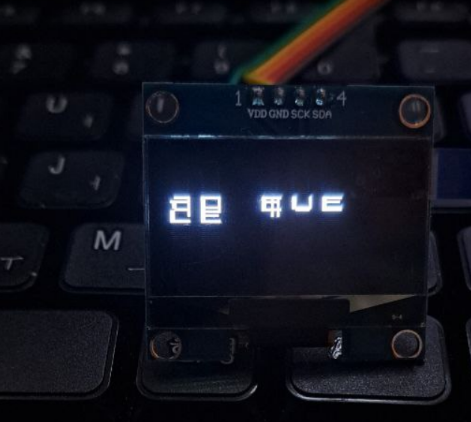
물론 수정된 소스로 제대로 표시하지 않았다.
그냥 참고용으로 남겨본다.
원본 블로그 사이트는 찾으니 안 보이는데 나중에라도 찾으며 링크 남기겠다.
※ 수정 소스 gfxhangul.h
#ifndef GFXHANGUL_H
#define GFXHANGUL_H

#include <Arduino.h>
#include <Adafruit_GFX.h>
#include "font_ascii.h"
#include "font_hangul.h"

struct Hangul {
  int8_t cho;
  int8_t jung;
  int8_t jong;
};

class hangul {
private:
  Adafruit_GFX* gfx = nullptr;

  // ===== UTF-8 decode =====
  uint16_t decodeUTF8(const char*& p) {
    uint8_t c = (uint8_t)*p++;
    if (c < 0x80) return c;
    if ((c & 0xE0) == 0xC0) return ((c & 0x1F) << 6) | (*p++ & 0x3F);
    if ((c & 0xF0) == 0xE0) return ((c & 0x0F) << 12) | ((*p++ & 0x3F) << 6) | (*p++ & 0x3F);
    return '?';
  }

  // ===== 한글 분해 =====
  Hangul decodeHangul(uint16_t code) {
    Hangul h = {-1, -1, -1};

    if (code >= 0xAC00 && code <= 0xD7A3) {
      uint16_t off = code - 0xAC00;
      h.cho  = off / 588;
      h.jung = (off % 588) / 28;
      h.jong = off % 28;
    }
    else if (code >= 0x3131 && code <= 0x314E) h.cho = code - 0x3131;
    else if (code >= 0x314F && code <= 0x3163) h.jung = code - 0x314F;
    else if (code >= 0x3165 && code <= 0x318E) h.jong = code - 0x3165;

    return h;
  }

  uint8_t get_first_beol(uint8_t jung, uint8_t jong) {
    switch(jung) {
      case 1: case 2: case 3: case 4: case 5: case 6: case 7: case 20: return jong == 0 ? 0 : 5;
      case 8: case 12: case 18: return jong == 0 ? 1 : 6;
      case 13: case 17: return jong == 0 ? 2 : 6;
      case 9: case 10: case 11: case 19: return jong == 0 ? 3 : 7;
      default: return jong == 0 ? 4 : 7;
    }
  }

  uint8_t get_second_beol(uint8_t cho, uint8_t jong) {
    if (cho == 0 || cho == 15) return jong == 0 ? 0 : 2;
    return jong == 0 ? 1 : 3;
  }

  uint8_t get_last_beol(uint8_t jung) {
    switch(jung) {
      case 0: case 2: case 9: return 0;
      case 4: case 6: case 11: case 14: case 16: case 19: case 20: return 1;
      case 3: case 5: case 7: case 10: case 15 : return 2;
      default: return 3;
    }
  }

  void render_beol_to_buf(uint8_t col, uint8_t line, byte buf[16][2]) {
    uint16_t off = 1024 * line + col * 2;
    for (uint8_t row = 0; row < 16; row++) {
      buf[row][0] |= font_hangul[off];
      buf[row][1] |= font_hangul[off + 1];
      off += 64;
    }
  }

  // ===== ASCII bitmap 출력 =====
  void drawAscii(char c, int x, int y, uint16_t color) {
    uint8_t bmp[16];
    int ptr = ((int)c) * 16;
    for (int i = 0; i < 16; i++) bmp[i] = font_ascii[ptr + i];
    gfx->drawBitmap(x, y, bmp, 8, 16, color);
  }

  // ===== 한글 bitmap 출력 (최적화 핵심) =====
  void drawHangul(uint16_t code, int x, int y, uint16_t color) {
    byte buf[16][2] = {0};
    uint8_t bmp[32];

    Hangul h = decodeHangul(code);

    if (h.cho >= 0) {
      uint8_t b1 = (h.jung >= 0) ? get_first_beol(h.jung, h.jong) : 0;
      render_beol_to_buf(h.cho, b1, buf);
    }
    if (h.jung >= 0) {
      uint8_t b2 = (h.cho >= 0) ? get_second_beol(h.cho, h.jong) : 0;
      render_beol_to_buf(h.jung, 8 + b2, buf);
    }
    if (h.jong > 0) {
      uint8_t b3 = (h.jung >= 0) ? get_last_beol(h.jung) : 0;
      render_beol_to_buf(h.jong, 12 + b3, buf);
    }

    for (int r = 0; r < 16; r++) {
      bmp[r * 2]     = buf[r][0];
      bmp[r * 2 + 1] = buf[r][1];
    }

    gfx->drawBitmap(x, y, bmp, 16, 16, color);
  }

public:
  void attachGFX(Adafruit_GFX* g) { gfx = g; }

  void print(const char* str, int x, int y, uint16_t color) {
    if (!gfx) return;

    int cx = x, cy = y;

    while (*str) {
      uint16_t ch = decodeUTF8(str);

      if (ch == '\n') { cy += 16; cx = x; continue; }
      if (ch == '\r') continue;

      if ((ch >= 0xAC00 && ch <= 0xD7A3) || (ch >= 0x3131 && ch <= 0x318E)) {
        drawHangul(ch, cx, cy, color);
        cx += 16;
      }
      else if (ch < 0x100) {
        drawAscii((char)ch, cx, cy, color);
        cx += 8;
      }
    }
  }
};

#endif
'Hardware > ESP32' 카테고리의 다른 글
| ESP8266 + SH1106 조합형 한글 출력 #3 (0) | 2026.02.04 |
|---|---|
| ESP8266 + SH1106 조합형 한글 출력 #2(예제) (0) | 2026.02.04 |
| ESP 기반 IoT (0) | 2026.01.30 |
| Ollama + MCP + ESP32 2대 제어하기(1) (0) | 2026.01.28 |
| ESP32 WebSocket 연습 1 (0) | 2026.01.09 |