
지난 번 조합형 한글 출력 함수를 이용해서 시리얼 통신 화면에서 입력하며
SH1106 OLED 디스플레이에 출력하는 예제를 만들어 보았다.
마지막 글자가 한글이며 스페이스를 넣어야 했다.
그렇지 않으며 마지막 글자로 한 줄 더 나오는 형상이 있었다.
※ 소스 ex.ino
#include <Arduino.h>
#include <Adafruit_SH110X.h>
#include <Wire.h>
#include "gfxhangul.h"

#define FONT_HEIGHT 16
#define MAX_LINES (64 / FONT_HEIGHT)  // 4줄

Adafruit_SH1106G display(128, 64, &Wire, -1);
hangul hr;

String lines[MAX_LINES];
int lineCount = 0;
String inputBuffer = "";

void redraw() {
  display.clearDisplay();

  int y = 0;
  for (int i = 0; i < lineCount; i++) {
    hr.print(lines[i].c_str(), 0, y, 1);
    y += FONT_HEIGHT;
  }

  display.display();
}

void addLine(String text) {
  if (lineCount < MAX_LINES) {
    lines[lineCount++] = text;
  } else {
    // 스크롤
    for (int i = 0; i < MAX_LINES - 1; i++) {
      lines[i] = lines[i + 1];
    }
    lines[MAX_LINES - 1] = text;
  }

  redraw();
}

void setup() {
  Serial.begin(115200);

  display.begin(0x3C, true);
  display.clearDisplay();

  hr.attachGFX(&display);

  addLine("시리얼 대기...");
}

void loop() {
  while (Serial.available()) {
    char c = Serial.read();

    if (c == '\n') {
      addLine(inputBuffer);
      inputBuffer = "";
    }
    else if (c != '\r') {
      inputBuffer += c;
    }
  }
}
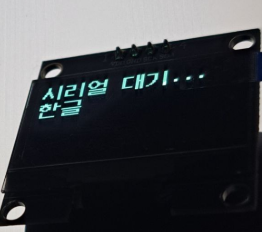
※ 실행
'Hardware > ESP32' 카테고리의 다른 글
| ESP8266 + SH1106 조합형 한글 출력 #4(WebSerial) (0) | 2026.02.04 |
|---|---|
| ESP8266 + SH1106 조합형 한글 출력 #3 (0) | 2026.02.04 |
| ESP8266 + SH1106 조합형 한글 출력 #1 (0) | 2026.02.04 |
| ESP 기반 IoT (0) | 2026.01.30 |
| Ollama + MCP + ESP32 2대 제어하기(1) (0) | 2026.01.28 |