
728x90
이번에 ESP32에서 websocket를 이용해서 LED 끄기/켜기를 한다.
※ 준비물
ESP32 Dev Board
※ 소스
#include <WiFi.h>
#include <AsyncTCP.h>
#include <ESPAsyncWebServer.h>
#include <LittleFS.h>

#define LED_PIN 2
#define BTN_PIN 0

const char* ap_ssid = "ESP32_AP";
const char* ap_pass = "12345678";   // 최소 8자

AsyncWebServer server(80);
AsyncWebSocket ws("/ws");

bool ledState = false;
bool lastBtn = true;

void onWsEvent(AsyncWebSocket *server,
               AsyncWebSocketClient *client,
               AwsEventType type,
               void *arg,
               uint8_t *data,
               size_t len) {
  if (type == WS_EVT_CONNECT) {
    String s = String("{\"led\":") + (ledState?1:0) +
               ",\"btn\":" + ((digitalRead(BTN_PIN)==LOW)?1:0) + "}";
    client->text(s);
  }
}

void setup() {
  Serial.begin(115200);

  pinMode(LED_PIN, OUTPUT);
  digitalWrite(LED_PIN, LOW);

  pinMode(BTN_PIN, INPUT_PULLUP);

  LittleFS.begin(true);

  // ===== AP MODE =====
  WiFi.mode(WIFI_AP);
  WiFi.softAP(ap_ssid, ap_pass);

  Serial.print("AP IP: ");
  Serial.println(WiFi.softAPIP());  // 192.168.4.1

  ws.onEvent(onWsEvent);
  server.addHandler(&ws);

  // LED ON
  server.on("/led/on", HTTP_GET, [](AsyncWebServerRequest *req){
    ledState = true;
    digitalWrite(LED_PIN, HIGH);
    ws.textAll("{\"led\":1}");
    req->send(200, "text/plain", "ON");
  });

  // LED OFF
  server.on("/led/off", HTTP_GET, [](AsyncWebServerRequest *req){
    ledState = false;
    digitalWrite(LED_PIN, LOW);
    ws.textAll("{\"led\":0}");
    req->send(200, "text/plain", "OFF");
  });

  // 버튼 상태 조회
  server.on("/btn", HTTP_GET, [](AsyncWebServerRequest *req){
    bool pressed = (digitalRead(BTN_PIN)==LOW);
    req->send(200, "application/json",
      pressed ? "{\"btn\":1}" : "{\"btn\":0}");
  });

  server.serveStatic("/", LittleFS, "/")
        .setDefaultFile("index.html");

  server.begin();
}

void loop() {
  bool now = digitalRead(BTN_PIN);
  if (now != lastBtn) {
    lastBtn = now;
    ws.textAll(now==LOW ? "{\"btn\":1}" : "{\"btn\":0}");
  }
  ws.cleanupClients();
  delay(10);
}
data/index.html
<!DOCTYPE html>
<html>
<head>
<meta charset="utf-8">
<title>ESP32 LED & Button</title>
</head>
<body>

<h2>LED Control</h2>
<button onclick="fetch('/led/on')">LED ON</button>
<button onclick="fetch('/led/off')">LED OFF</button>
<p>LED: <b id="led">-</b></p>

<h2>GPIO Button</h2>
<p>Button: <b id="btn">-</b></p>

<script>
const led = document.getElementById('led');
const btn = document.getElementById('btn');

const ws = new WebSocket(`ws://${location.host}/ws`);

ws.onmessage = e => {
  const j = JSON.parse(e.data);
  if ('led' in j) led.innerText = j.led ? 'ON' : 'OFF';
  if ('btn' in j) btn.innerText = j.btn ? 'PRESSED' : 'RELEASED';
};

// 주기적 보정(선택)
setInterval(() => {
  fetch('/led').then(r=>r.json()).then(j=>led.innerText=j.led?'ON':'OFF');
  fetch('/btn').then(r=>r.json()).then(j=>btn.innerText=j.btn?'PRESSED':'RELEASED');
}, 1000);
</script>

</body>
</html>
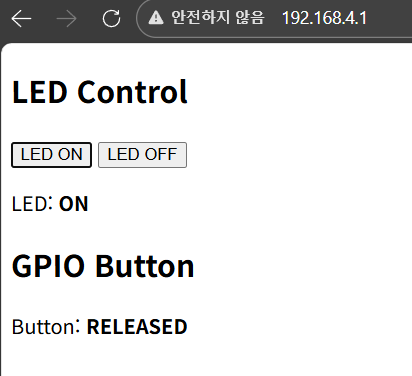
※ 실행화면
728x90
'Hardware > ESP32' 카테고리의 다른 글
| ESP 기반 IoT (0) | 2026.01.30 |
|---|---|
| Ollama + MCP + ESP32 2대 제어하기(1) (0) | 2026.01.28 |
| ESP32 LittleFS 업로더 설치 (0) | 2026.01.09 |
| ESP32와 WS2812 RGB LED 2 - 12개 원형 모듈 (1) | 2026.01.08 |
| ESP32와 WS2812 RGB LED 1 - strip (0) | 2026.01.08 |