
아래와 같은 벽돌깨기 게임을 Javascipt로 만들어보자.
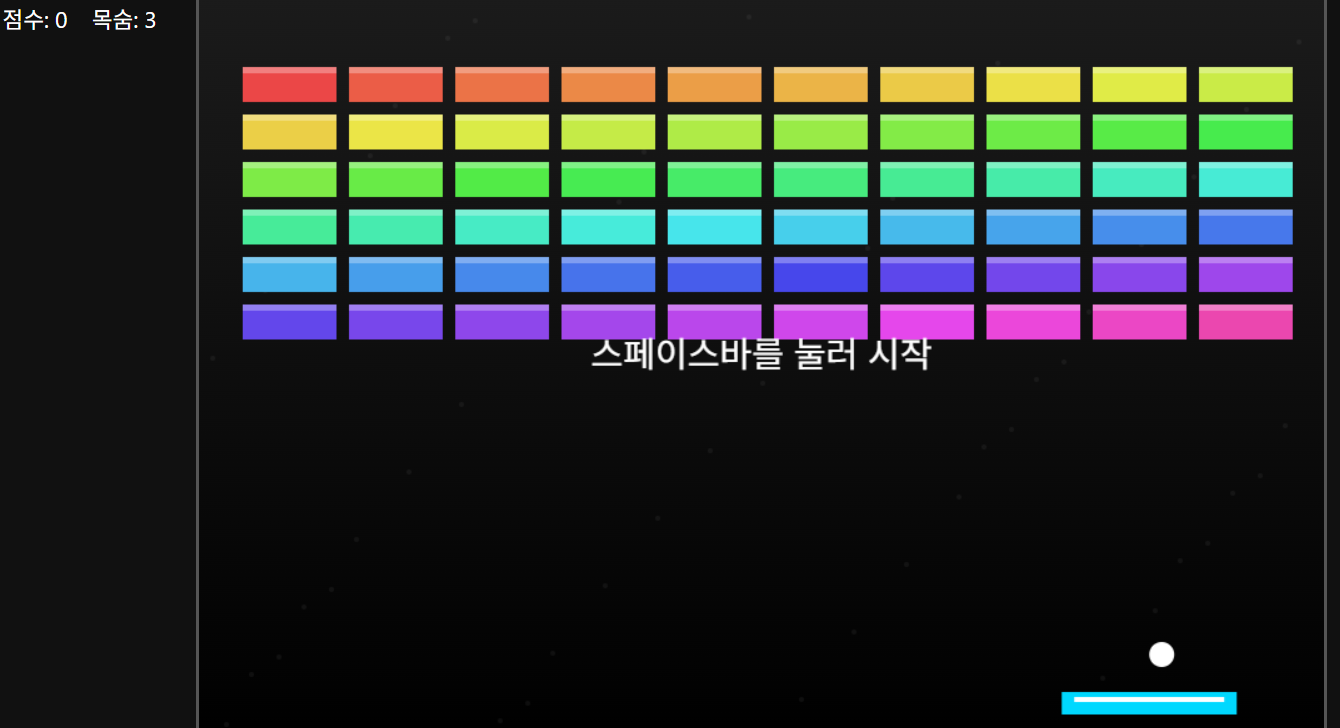
<!DOCTYPE html>
<html lang="ko">
<head>
<meta charset="UTF-8" />
<meta name="viewport" content="width=device-width, initial-scale=1.0"/>
<title>벽돌깨기 게임</title>
<style>
*{
margin:0;
padding:0;
box-sizing:border-box;
}
body{
background:#111;
overflow:hidden;
font-family:Arial, sans-serif;
color:white;
}
canvas{
display:block;
margin:auto;
background:linear-gradient(#1b1b1b,#000);
border:3px solid #555;
}
.info{
position:absolute;
top:10px;
left:10px;
font-size:18px;
}
.help{
position:absolute;
bottom:10px;
left:10px;
color:#aaa;
}
</style>
</head>
<body>
<div class="info">
점수: <span id="score">0</span>
목숨: <span id="life">3</span>
</div>
<div class="help">
← → 이동 / 스페이스 시작
</div>
<canvas id="game" width="900" height="600"></canvas>
<script>
const canvas = document.getElementById("game");
const ctx = canvas.getContext("2d");
const scoreEl = document.getElementById("score");
const lifeEl = document.getElementById("life");
let score = 0;
let life = 3;
let started = false;
// 패들
const paddle = {
width:140,
height:18,
x:canvas.width/2 - 70,
y:canvas.height - 40,
speed:9,
dx:0
};
// 공
const ball = {
x:canvas.width/2,
y:canvas.height - 70,
radius:10,
speed:5,
dx:5,
dy:-5
};
// 벽돌
const brick = {
row:6,
col:10,
width:75,
height:28,
gap:10,
top:60,
left:35
};
let bricks = [];
function createBricks(){
bricks = [];
for(let r=0; r<brick.row; r++){
bricks[r] = [];
for(let c=0; c<brick.col; c++){
const x = brick.left + c * (brick.width + brick.gap);
const y = brick.top + r * (brick.height + brick.gap);
bricks[r][c] = {
x,
y,
visible:true,
color:`hsl(${r*50+c*8},80%,60%)`
};
}
}
}
createBricks();
// 입력
document.addEventListener("keydown", e => {
if(e.key === "ArrowRight"){
paddle.dx = paddle.speed;
}
else if(e.key === "ArrowLeft"){
paddle.dx = -paddle.speed;
}
else if(e.code === "Space"){
started = true;
}
});
document.addEventListener("keyup", e => {
if(
e.key === "ArrowRight" ||
e.key === "ArrowLeft"
){
paddle.dx = 0;
}
});
// 마우스 이동
document.addEventListener("mousemove", e => {
const rect = canvas.getBoundingClientRect();
const mouseX = e.clientX - rect.left;
paddle.x = mouseX - paddle.width/2;
if(paddle.x < 0) paddle.x = 0;
if(paddle.x + paddle.width > canvas.width){
paddle.x = canvas.width - paddle.width;
}
});
// 패들 그리기
function drawPaddle(){
ctx.fillStyle = "#00d8ff";
ctx.fillRect(
paddle.x,
paddle.y,
paddle.width,
paddle.height
);
ctx.fillStyle = "#fff";
ctx.fillRect(
paddle.x + 10,
paddle.y + 4,
paddle.width - 20,
4
);
}
// 공 그리기
function drawBall(){
ctx.beginPath();
ctx.arc(ball.x, ball.y, ball.radius, 0, Math.PI*2);
ctx.fillStyle = "#fff";
ctx.fill();
ctx.closePath();
}
// 벽돌 그리기
function drawBricks(){
bricks.forEach(row => {
row.forEach(b => {
if(!b.visible) return;
ctx.fillStyle = b.color;
ctx.fillRect(
b.x,
b.y,
brick.width,
brick.height
);
ctx.fillStyle = "rgba(255,255,255,0.3)";
ctx.fillRect(
b.x,
b.y,
brick.width,
5
);
});
});
}
// 패들 이동
function movePaddle(){
paddle.x += paddle.dx;
if(paddle.x < 0){
paddle.x = 0;
}
if(paddle.x + paddle.width > canvas.width){
paddle.x = canvas.width - paddle.width;
}
}
// 공 이동
function moveBall(){
if(!started){
ball.x = paddle.x + paddle.width/2;
return;
}
ball.x += ball.dx;
ball.y += ball.dy;
// 벽 충돌
if(ball.x + ball.radius > canvas.width || ball.x - ball.radius < 0){
ball.dx *= -1;
}
if(ball.y - ball.radius < 0){
ball.dy *= -1;
}
// 패들 충돌
if(
ball.y + ball.radius > paddle.y &&
ball.x > paddle.x &&
ball.x < paddle.x + paddle.width
){
let hitPos = ball.x - (paddle.x + paddle.width/2);
ball.dx = hitPos * 0.15;
ball.dy = -Math.abs(ball.dy);
}
// 바닥
if(ball.y > canvas.height){
life--;
lifeEl.textContent = life;
started = false;
ball.x = canvas.width/2;
ball.y = canvas.height - 70;
ball.dx = 5;
ball.dy = -5;
paddle.x = canvas.width/2 - paddle.width/2;
if(life <= 0){
alert("게임 오버!");
resetGame();
}
}
}
// 벽돌 충돌
function collisionDetection(){
bricks.forEach(row => {
row.forEach(b => {
if(!b.visible) return;
if(
ball.x > b.x &&
ball.x < b.x + brick.width &&
ball.y - ball.radius < b.y + brick.height &&
ball.y + ball.radius > b.y
){
ball.dy *= -1;
b.visible = false;
score += 10;
scoreEl.textContent = score;
checkWin();
}
});
});
}
// 승리 체크
function checkWin(){
let cleared = true;
bricks.forEach(row => {
row.forEach(b => {
if(b.visible) cleared = false;
});
});
if(cleared){
alert("클리어!");
brick.row++;
createBricks();
started = false;
ball.x = canvas.width/2;
ball.y = canvas.height - 70;
}
}
// 게임 초기화
function resetGame(){
score = 0;
life = 3;
scoreEl.textContent = score;
lifeEl.textContent = life;
brick.row = 6;
createBricks();
started = false;
}
// 배경
function drawBackground(){
for(let i=0;i<60;i++){
ctx.fillStyle = "rgba(255,255,255,0.05)";
ctx.beginPath();
ctx.arc(
(i*157)%canvas.width,
(i*91)%canvas.height,
2,
0,
Math.PI*2
);
ctx.fill();
}
}
// 렌더
function draw(){
ctx.clearRect(0,0,canvas.width,canvas.height);
drawBackground();
drawBricks();
drawPaddle();
drawBall();
movePaddle();
moveBall();
collisionDetection();
if(!started){
ctx.fillStyle = "#fff";
ctx.font = "28px Arial";
ctx.textAlign = "center";
ctx.fillText(
"스페이스바를 눌러 시작",
canvas.width/2,
canvas.height/2
);
}
requestAnimationFrame(draw);
}
draw();
</script>
</body>
</html>'Software > JavaScript' 카테고리의 다른 글
| Javascript 시작하기 - 국기콤보#2 (0) | 2026.10.30 |
|---|---|
| Javascript 시작하기 - 오셀로 (0) | 2026.10.28 |
| Javascript 시작하기 - 1024 게임 (0) | 2026.10.26 |
| Javascript 시작하기 - 지뢰찾기 (0) | 2026.10.24 |
| Javascript 시작하기 - 장기 (0) | 2026.10.23 |