
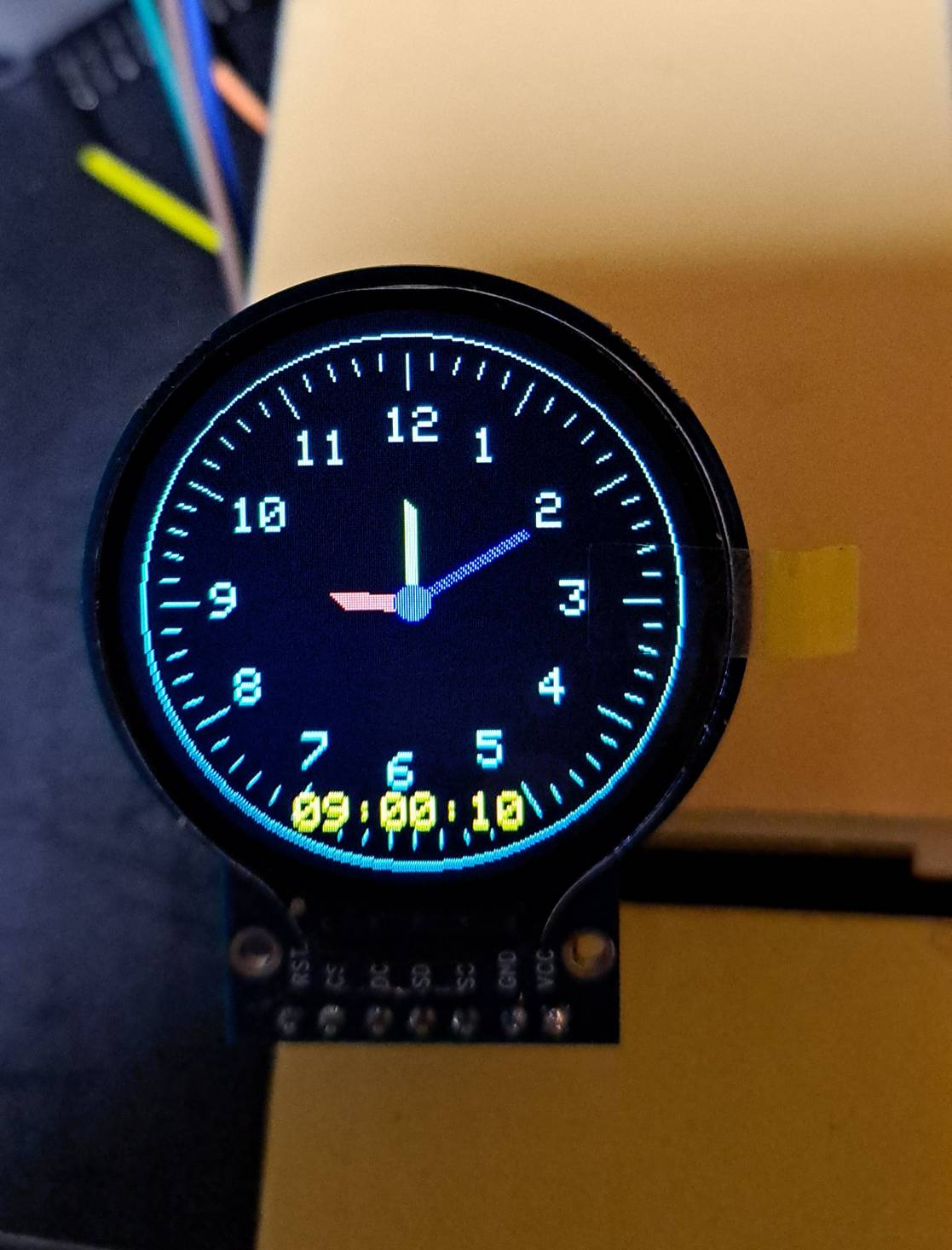
이 번에 ESP32 DevKit와 원형 TFT LCD를 이용하여 시계를 만들어 보자.
우연히 쇼핑물 사이트에서 원형 LCD를 찾아서 구매앴는데 어제 도착해서
오늘 테스트를 하고자한다.
※ 준비물
ESP32 Dev Board
1.28 Inch Round Circular TFT LCD Display Module
점퍼케이블(F-F) x 7
※ 핀 연결
| TFT LCD Pin | ESP32 | Description |
| VCC | 3.3V | Power supply (3.3V or 5V) |
| GND | GND | Ground |
| SCL | GPIO18 | SPI Clock |
| SDA | GPIO23 | SPI MOSI |
| DC | GPIO25 | Data/Command |
| CS | GPIO26 | Chip Select |
| RST | GPIO27 | Reset (optional) |
※ 라이브러리

※ 소스
/*
 * This ESP32 code is created by esp32io.com
 *
 * This ESP32 code is released in the public domain
 *
 * For more detail (instruction and wiring diagram), visit https://esp32io.com/tutorials/esp32-round-circular-tft-lcd-display
 */

#include <DIYables_TFT_Round.h>
#include <math.h>

#define PIN_RST 27 // The ESP32 pin GPIO27 connected to the RST pin of the circular TFT display
#define PIN_DC 25 // The ESP32 pin GPIO25 connected to the DC pin of the circular TFT display
#define PIN_CS 26 // The ESP32 pin GPIO26 connected to the CS pin of the circular TFT display

#define COLOR_BACKGROUND DIYables_TFT::colorRGB(0, 0, 0)  // Black
#define COLOR_HOUR DIYables_TFT::colorRGB(255, 80, 80)    // Red-ish
#define COLOR_MINUTE DIYables_TFT::colorRGB(80, 255, 80)  // Green-ish
#define COLOR_SECOND DIYables_TFT::colorRGB(0, 0, 255)    // Blue
#define COLOR_TICK DIYables_TFT::colorRGB(0, 255, 200)    // Light gray

DIYables_TFT_GC9A01_Round TFT_display(PIN_RST, PIN_DC, PIN_CS);

const int CENTER_X = 120;
const int CENTER_Y = 120;
const int RADIUS = 110;
const int HOUR_LEN = 30;
const int MIN_LEN = 40;
const int SEC_LEN = 55;

// Preset offset for 09:00:05 in milliseconds
const unsigned long PRESET_MS =
  9UL * 3600000UL +  //  9 hours
  0UL * 60000UL +    //  0 minutes
  5UL * 1000UL;      //  5 seconds

float prevHourAngle = -1000, prevMinAngle = -1000, prevSecAngle = -1000;
int prevDispHour = -1, prevDispMin = -1, prevDispSec = -1;

void drawHand(int x, int y, float angle, int length, uint16_t color, int width) {
  int x2 = x + length * cos(angle - M_PI / 2);
  int y2 = y + length * sin(angle - M_PI / 2);
  for (int w = -width / 2; w <= width / 2; w++) {
    TFT_display.drawLine(x + w, y + w, x2 + w, y2 + w, color);
  }
}

void drawTicks() {
  for (int i = 0; i < 60; i++) {
    float angle = i * 6 * M_PI / 180.0;
    int x1 = CENTER_X + (RADIUS - 8) * cos(angle - M_PI / 2);
    int y1 = CENTER_Y + (RADIUS - 8) * sin(angle - M_PI / 2);
    int x2 = CENTER_X + (RADIUS - (i % 5 == 0 ? 22 : 14)) * cos(angle - M_PI / 2);
    int y2 = CENTER_Y + (RADIUS - (i % 5 == 0 ? 22 : 14)) * sin(angle - M_PI / 2);
    TFT_display.drawLine(x1, y1, x2, y2, COLOR_TICK);
  }
  TFT_display.setTextColor(COLOR_TICK, COLOR_BACKGROUND);
  TFT_display.setTextSize(2);
  for (int h = 1; h <= 12; h++) {
    float angle = (h * 30) * M_PI / 180.0;
    int tx = CENTER_X + (RADIUS - 38) * cos(angle - M_PI / 2) - 10;
    int ty = CENTER_Y + (RADIUS - 38) * sin(angle - M_PI / 2) - 8;
    TFT_display.setCursor(tx, ty);
    TFT_display.print(h);
  }
}

void printTime(int previous, int now, const char* offset, bool colon = true) {
  int16_t x = 70, y = 200;
  int16_t x1, y1;
  uint16_t w, h;
  TFT_display.getTextBounds(offset, x, y, &x1, &y1, &w, &h);

  // Update digital display
  TFT_display.setCursor(x + w, y);
  TFT_display.print("  ");
  TFT_display.setCursor(x + w, y);

  if (now < 10)
    TFT_display.print('0');

  TFT_display.print(now);

  if (colon)
    TFT_display.print(":");
}

void setup() {
  TFT_display.begin();
  TFT_display.fillScreen(COLOR_BACKGROUND);
  TFT_display.drawCircle(CENTER_X, CENTER_Y, RADIUS, COLOR_TICK);
  drawTicks();

  TFT_display.setTextColor(DIYables_TFT::colorRGB(255, 255, 0), COLOR_BACKGROUND);
  TFT_display.setTextSize(2);

  // Ensure first update in loop() repaints everything
  prevDispHour = -1;
  prevDispMin = -1;
  prevDispSec = -1;
}

void loop() {
  // Add preset offset to millis()
  unsigned long ms = millis() + PRESET_MS;

  float sec = fmod(ms / 1000.0, 60.0);
  float min = fmod(ms / 60000.0, 60.0);
  float hour = fmod(ms / 3600000.0, 12.0);

  int dispHour = (int)hour == 0 ? 12 : (int)hour;
  int dispMin = (int)min;
  int dispSec = (int)sec;

  float hourAngle = (hour + min / 60.0) * 30 * M_PI / 180.0;
  float minAngle = (min + sec / 60.0) * 6 * M_PI / 180.0;
  float secAngle = sec * 6 * M_PI / 180.0;

  // Hour hand (jumps), redraw when angle changed
  if (dispHour != prevDispHour || dispMin != prevDispMin) {
    if (prevHourAngle > -900)
      drawHand(CENTER_X, CENTER_Y, prevHourAngle, HOUR_LEN, COLOR_BACKGROUND, 7);  // clear old position
    drawHand(CENTER_X, CENTER_Y, hourAngle, HOUR_LEN, COLOR_HOUR, 7);
    prevHourAngle = hourAngle;

    // Update digital display
    if (dispHour != prevDispHour) {
      printTime(prevDispHour, dispHour, "");
      prevDispHour = dispHour;
    }
  }

  // Minute hand (jumps)
  if (dispMin != prevDispMin) {
    if (prevMinAngle > -900)
      drawHand(CENTER_X, CENTER_Y, prevMinAngle, MIN_LEN, COLOR_BACKGROUND, 5);  // clear old position
    drawHand(CENTER_X, CENTER_Y, minAngle, MIN_LEN, COLOR_MINUTE, 5);

    printTime(prevDispMin, dispMin, "00:");
    prevDispMin = dispMin;
    prevMinAngle = minAngle;
  }

  // Second hand (smooth)
  if (dispSec != prevDispSec) {
    if (prevSecAngle > -900)
      drawHand(CENTER_X, CENTER_Y, prevSecAngle, SEC_LEN, COLOR_BACKGROUND, 2);  // clear old position

    drawHand(CENTER_X, CENTER_Y, secAngle, SEC_LEN, COLOR_SECOND, 2);
    TFT_display.fillCircle(CENTER_X, CENTER_Y, 7, COLOR_SECOND);  // Redraw center dot

    // Update digital display
    printTime(prevDispSec, dispSec, "00:00:", false);
    prevDispSec = dispSec;
    prevSecAngle = secAngle;
  }
}
※ 실행화면
※ 참고 사이트
'Hardware > ESP32' 카테고리의 다른 글
| ESP32와 WS2812 RGB LED 2 - 12개 원형 모듈 (1) | 2026.01.08 |
|---|---|
| ESP32와 WS2812 RGB LED 1 - strip (0) | 2026.01.08 |
| ESP32와 64x32 RGB LED Matrix 4 - 시계 (0) | 2026.01.08 |
| ESP32 소개 - 보드 종류 (0) | 2025.10.17 |
| ESP32 와 64x32 RGB LED Matrix 3차 테스트 (1) | 2024.10.04 |