Hardware/라즈베리파이
라즈베리파이 + SH1106 I2C 사용 #1
초짜호야
2026. 2. 4. 18:58
728x90
ESP8266 + SH1106 I2C에서 사용했던 OLED 1.3" DISPLAY 모듈을
라즈베리파이에서 사용해봤다.
※ 핀 연결

SH1106 OLED (4핀 기준)
| OLED | Raspberry Pi |
| VCC | 3.3V (Pin 1 or 17) |
| GND | GND (Pin 6, 9, 14 등) |
| SDA | GPIO2 (Pin 3) |
| SCL | GPIO3 (Pin 5) |
※ I2C 활성화
sudo raspi-configInterface Options → I2C → Enable
재부팅
sudo reboot※ I2C 장치 확인
sudo apt install -y i2c-tools
i2cdetect -y 1
정상 출력 예:
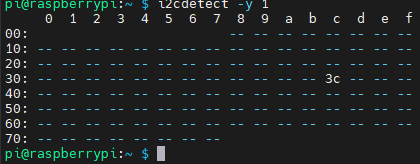
👉 주소: 0x3C (대부분 SH1106)
※ 라이브러리 설치 (Python)
sudo apt update
sudo apt install -y python3-pip
sudo apt install -y python3-venv

python3 -m venv oled-env
source oled-env/bin/activate
pip3 install luma.oled pillow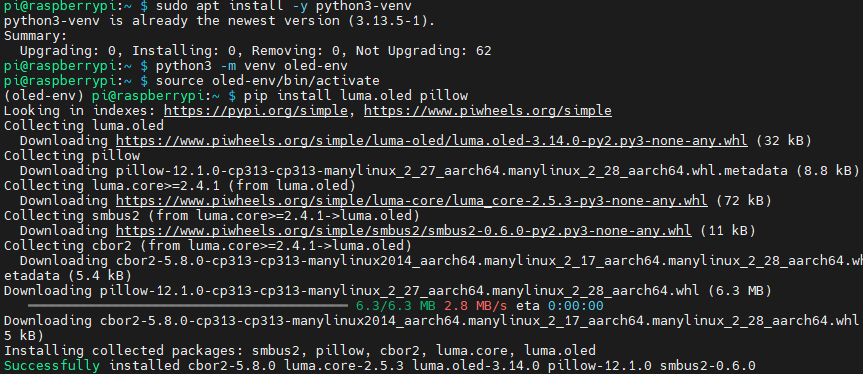
※ SH1106 테스트 코드 (Python)
from luma.core.interface.serial import i2c
from luma.oled.device import sh1106
from PIL import Image, ImageDraw, ImageFont
import time

serial = i2c(port=1, address=0x3C)
device = sh1106(serial)

# 화면 초기화
device.clear()

# 이미지 생성
image = Image.new("1", (device.width, device.height))
draw = ImageDraw.Draw(image)

draw.text((0, 0), "Hello SH1106!", fill=255)

device.display(image)

time.sleep(10)
실행:
python3 test.py
※ 한글 출력 (선택)
기본 폰트는 한글 미지원 → TTF 필요
font = ImageFont.truetype("/usr/share/fonts/truetype/nanum/NanumGothic.ttf", 12) draw.text((0, 0), "라즈베리파이", font=font, fill=255)※ SH1106 vs SSD1306 차이 (중요)
SH1106은 실제 해상도 132x64 → 화면 offset 필요할 수 있음
화면이 오른쪽으로 밀리면:
device = sh1106(serial, rotate=0)
또는 x offset 조정 필요 (라이브러리 따라 다름)
728x90